Introduction to Git
A Distributed Version Control System
Mauro Silberberg
Motivation
Motivation
Don’t do this, let git do it
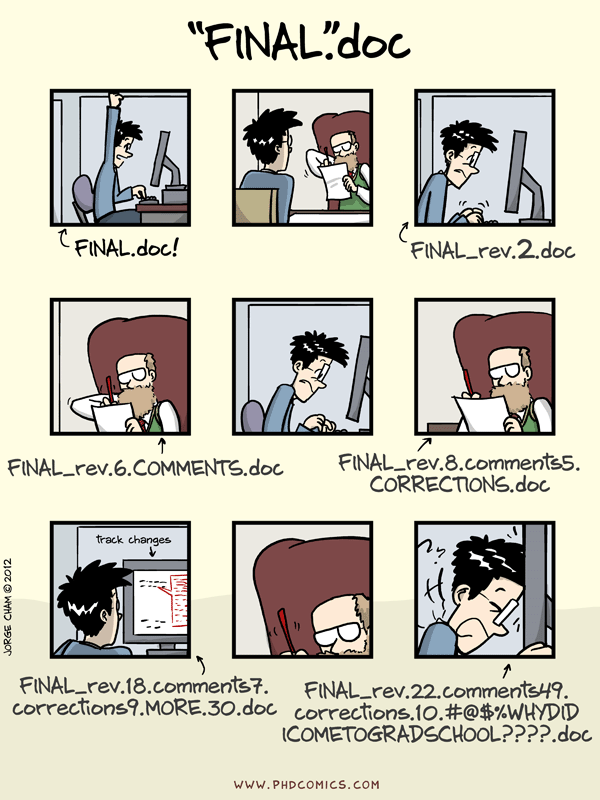
Which is the last? What changed?
How to use git
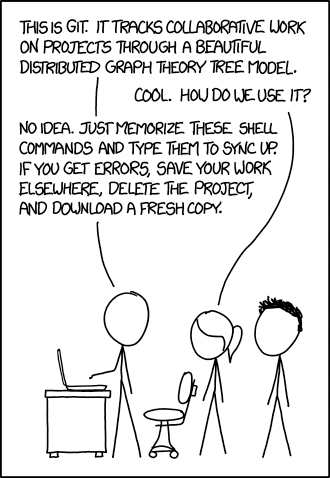
Why is it that hard?
Git commands
There are 141 git commands (as of git v2.50.1).
But we just use a small subset:
Local workflow (8-14)
git init
git add / rm
git commit
git status / log / diff
git checkout
git branch / tag
git reset / restore
git merge / rebase
Shared workflow (3-5)
git clone / remote
git fetch / pull
git push
More commands (8)
…that we won’t cover.
git bisect
git blame
git cherry-pick
git clean
git grep
git reflog
git submodule
git stash
Code vs data structures
Show me your code, and I’ll probably be mystified.
Show me your data structures, and I won’t usually need your code; it’ll be obvious.
Show me your code, and I’ll probably be mystified.
Show me your data structures, and I won’t usually need your code; it’ll be obvious.
— Fred Brooks (1975),
The Mythical Man-Month (paraphrased)
Show me your code, and I’ll probably be mystified.
Show me your data structures, and I won’t usually need your code; it’ll be obvious.
— Fred Brooks (1975),
The Mythical Man-Month (paraphrased)
— Brandon Rhodes (2025),
Keynote: Skip the Design Patterns — Architecting with Nouns and Verbs,
PyCon Lithuania (YouTube)
Let’s see what git commands do
to git’s data structures.
Index
Index
Git internals
- the
.gitdirectory - Objects: blob, tree, commit
More Git internals
- References: HEAD, heads, tags
Git commands
- add, commit, checkout, diff
More Git commands
- tag, branch, merge
Exercises
More Exercises
Hydration break
Let’s see the commands in action.
Git internals
Git directory
Git creates a .git directory next to the project files.
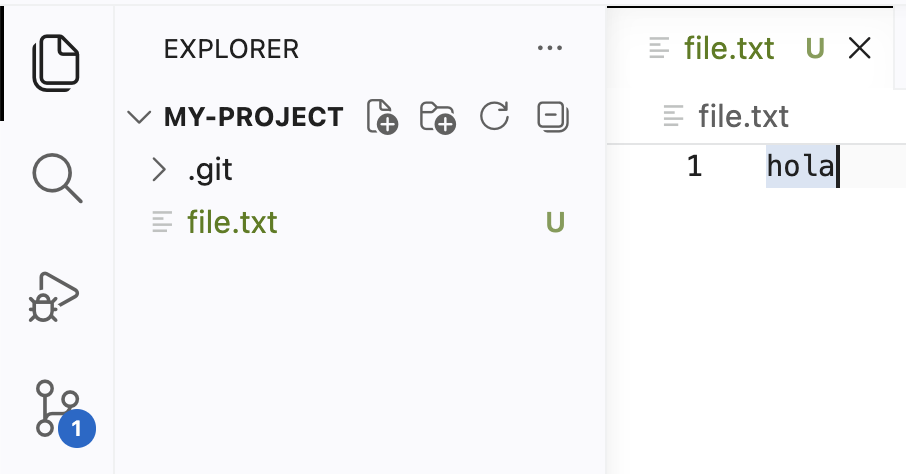
.git is hidden by default.
The .git directory contains:
| path | description |
|---|---|
.git/objects/ |
blob, tree, commit |
.git/index |
objects for next commit |
.git/refs/ |
“important” commits |
.git/HEAD |
current commit |
.git/config |
repository configuration |
among other things…
Content-addressable storage with hash functions
Hash functions
Map data of arbitrary size to fixed size.
Example: SHA256 uses 256 bits.
| data | size (bytes) | hash (64 bytes) |
|---|---|---|
| hola | 4 | 133ee9...332d44 |
| holA | 4 | 9b31a9...daa7a1 |
| a0a1…a999 | 3890 | ea624d...3f378b |
Content-addressable storage
Assign filename based on the file content.
Usage: do you have…
a0a1a2...a999? 3890 bytes. Wastefulea624d...3f378b? 64 bytes. Efficient.
Git uses this to store objects:
blobs, trees and commits
Git object: blob (Binary Large OBject)
Create a text file:
To store it, Git computes its hash:
and saves it into .git/objects/5c1b14...
Note it does not store its filename.
Git object: tree (directory)
To store a directory tree, Git creates a list of metadata:
type hash nameand saves it in: .git/objects/eddce4...
Why eddce4...? It is the hash of that text file.
What do file.txt and file2.txt have?
Git object: commit
A commit is a checkpoint in history.
It stores:
Commit graph
The project history is a graph of commit objects
commit ea5c17...
tree eddce4...
A commit’s hash “has” all the repository’s history.
Git commands
First commit: add file
Commands:
Directory state:
Second commit: modify file
Commands:
Directory state:
Third commit: remove file
Commands:
Directory state:
Question: If I uploaded sensitive information, ¿did I remove it correctly?
Checkout commit: navigate history
Directory state:
├── .git/
│   ├── index
│   └── objects/
│       ├── 5c1b14.. #   blob: hola
│       ├── 27b5ad.. #   tree: 5c1b14.. file.txt
│       ├── 4a53b0.. # commit: tree 27b5ad..
│       ├── 4099a6.. #   blob: chau
│       ├── c6a5f5.. #   tree: 4099a6.. file.txt
│       ├── 6d43b7.. # commit: tree c6a5f5..
│       ├── 825dc6.. #   tree:
│       └── 954305.. # commit: tree 825dc6..
│
└── file.txt
Difference between commits
Command:
Directory state:
├── .git/
│   ├── index
│   └── objects/
│       ├── 5c1b14.. #   blob: hola
│       ├── 27b5ad.. #   tree: 5c1b14.. file.txt
│       ├── 4a53b0.. # commit: tree 27b5ad..
│       ├── 4099a6.. #   blob: chau
│       ├── c6a5f5.. #   tree: 4099a6.. file.txt
│       ├── 6d43b7.. # commit: tree c6a5f5..
│       ├── 825dc6.. #   tree:
│       └── 954305.. # commit: tree 825dc6..
│
└── file.txt
Hydration break
Let’s do some exercises. # Git internals: named commits
Git directory (again)
Already covered some of the internals:
| seen | path | description |
|---|---|---|
| ✅ | .git/objects/ |
blob, tree, commit |
| ✅ | .git/index |
objects for next commit |
| ❌ | .git/HEAD |
current commit |
| ❌ | .git/refs/ |
“important” commits |
| ❌ | .git/config |
repository configuration |
Next:
| ref | description |
|---|---|
| HEAD | points to the current commit |
| tag | fixed alias for a commit |
| branch | moving alias for a commit |
Git HEAD
In .git/HEAD, git stores the current checked-out commit.
Git tags
In .git/refs/tags/, git stores “fixed” aliases for commits.
Commit graph
Files
Usually used for “annotating” a release.
Git branches
In .git/refs/heads/, git stores “moving” aliases for commits.
Commit graph
Files
Usually used for developing changes.
Summary: HEAD, heads and tags
In .git/HEAD, git stores the current commit.
ref: refs/heads/<NAME>for a branch,<HASH>when in detached HEAD state.
In .git/refs/, git stores “named” commits:
.git/refs/heads/<NAME>for branches,.git/refs/tags/<NAME>for tags.
When HEAD is a reference to a branch,
doing commit advances that branch.
Important:
objects not referenced by
✨ named commits ✨
could be deleted.
Git garbage collect
Important: objects not referenced by ✨ named commits ✨ could be deleted.
Which commits could be deleted by git gc?
Git branches
Using branches
Idea:
- Leave the
mainin a working state. - Start developing changes in a new branch.
- Switch back to
mainif we need to run (a working version of) the code.
Commit graph
Files
Merging branches
The changes are ready. Let’s add them to main.
Commit graph
Note: main also had a commit.
Files
The merge commit has two parents.
Merge fast-forward (FF)
Skiping the merge commit.
Before
No FF
FF (default)
The dev branch contains all commits from main.
A simpler commit history.
Merge conflict
Hydration break
Let’s do more exercises.
Git remotes and GitHub